June 08, 2026



| Mplus |
| Mplus at a Glance |
 General Description
 |
|
Mplus Programs |
| Pricing |
| Version History |
| System Requirements |
| Platforms |
| Mplus Demo Version |
| Training |
| Mplus Web Talks |
| and Papers |
| Short Courses |
| Short Course Videos |
| and Handouts |
| Web Training |
| Mplus YouTube Channel |
| Documentation |
| Mplus User's Guide |
| Mplus Diagrammer |
| User's Guide Examples |
| Mplus Book |
| Mplus Book Examples |
| Mplus Book Errata |
| Technical Appendices |
| Mplus Web Notes |
| FAQ |
| Analyses/Research |
|
Mplus Examples |
| Papers |
| References |
| How-To |
| Using Mplus via R - |
| MplusAutomation |
| Mplus plotting using R |
| H5 results |
| Chi-Square Difference |
| Test for MLM and MLR |
| Power Calculation |
| Monte Carlo Utility |
| Search |
| Mplus Website Updates |
| Mplus Privacy Policy |
| VPAT/508 Compliance |
Mplus Version 6.11 Base Program and Combination Add-On Update
Mplus Version 6.11 Base Program and Combination Add-On Update is now available free for users of Mplus Base Program and Combination Add-On versions 3.0 or greater whose Mplus Product Support and Upgrade Contract is still current.
Instructions for applying the update
- Mplus Base Program and Combination Add-On versions 3.0 or greater must be installed on your computer before applying the update.
- Download the update file by clicking on the link and saving it into a temporary
working directory, C:\TEMP for example. The update file should correspond
with the currently installed version.
Mplus 32-bit update: Combo_v611.exe (last updated: July 28, 2011)
IMPORTANT: The Mplus 64-bit updates should only be installed on computers with a 64-bit operating system. Please check the system properties before installing this update. Mplus 64-bit will not run on 32-bit computers.
Mplus 64-bit update: Combo64_v611.exe (last updated: July 28, 2011)
IMPORTANT NOTE: Mplus updates should be installed with an administrator account on Windows XP and Windows Vista. Problems may arise when running Mplus if the updates have been installed using a non-administrative account.
- The update files are software installation executables. Double-click
on the downloaded file in Windows Explorer or run it from Start and Run.
- The update program will ask you to enter your Mplus license number. The Mplus license number
can be found on the inside backcover of your Mplus User's Guide.
Mplus Version 6.11 Base Program and Combination Add-On Update

Found Mplus.exe in: C:\Program Files\Mplus

The license number can be found on the inside backcover of the
Mplus User's Guide.

Enter the license number:
- If the license number you've entered is valid, the update program will display a password
in the MS-DOS window.
Enter the license number:  license10

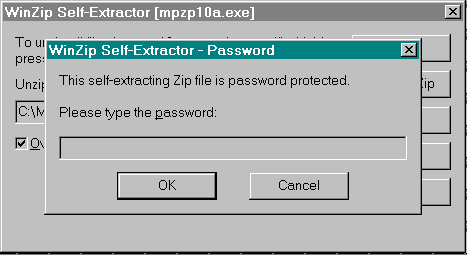
When prompted for a password by the self-extracting executable,
enter this password (case sensitive).

yourpasswordhere

Press any key to continue.
This password is needed for the self-extracting executable included with the update. Enter the password when prompted by the WinZip Self-Extractor.
- The update program finds the Mplus installation directory and reiterates
this information in the line
Found Mplus.exe in: C:\Program Files\Mplus
After the password is entered, the update will be applied.